Blog / Local SEO
Google Business Profile for Pest Control: The Complete Guide

A Google Business Profile for pest control works when it’s verified, uses your real business name and the “Pest control service” category, links to a matching location page, and gets a new review and a new post every week. Google’s rules for service businesses are strict, so set it up right once and check it every month.
For most pest control companies, the profile brings in the cheapest calls they get. If you’re under about $500K a year in revenue, I’d put most of your marketing effort into it, along with Local Services Ads. When I wrote The Complete Guide to Pest Control SEO in early 2025, I drew that line at $1 million. I’ve since moved it down.
How to set up a Google Business Profile for pest control
Start at business.google.com, or search your company name and claim the profile if Google already made one. Sign in with a Google account the company controls, not a technician’s personal Gmail. Enter your name, primary category, phone number and website, and tell Google whether customers come to you or you go to them.
Then verify. Google decides which methods you’re offered, and they can include a phone call or text, email, a live video call or a recorded video. Its video verification rules ask a service-area business to show three things in one video of at least 30 seconds.
- Where you are, using street signs or landmarks near your business address. If you run the company from home, signs in your neighborhood count.
- That the business exists, with your sprayer, branded uniform or work truck in the shot.
- That you run it. Open your locked, branded truck or storage room, or show a business permit, invoice or utility bill with your profile’s name on it.
Plan the route so you get it in one take, and keep customers’ faces and any bank, tax or ID numbers out of the shot. Review can take up to 5 business days. Verifying also helps you rank, since Google says a verified profile is more likely to show up in search results.
Your name and categories
Use your real-world name
Google’s guidelines for representing your business say your profile name should reflect your real-world name, without added service or location information, taglines or phone numbers. “Smith Pest Control” is fine. “Smith Pest Control | Termite & Rodent Exterminator Raleigh” is the kind of name competitors report and Google suspends.
Owners do it because keywords in the name help. If “pest control” isn’t in your real name, the honest fix is a real rename with a DBA, new signs and trucks. That’s a bigger call than SEO, and I cover it in naming a pest control company.
Changing the name, adding or moving a location and changing the phone number are the three edits I’ve seen set off the most suspensions, so make them rarely. If you run Local Services Ads, your name, address and hours sync from the Business Profile once your account moves into Google Ads, and a significant name or address change may set off a 24 to 48 hour review that pauses the campaign.
Pick a primary category, then a few more
Google says the categories you select affect your local ranking. If pest control is your main business, your primary category is Pest control service. If lawn care is, use Lawn care service.
Most profiles I see are missing additional categories. Depending on what you sell, Bird control service, Animal control service or Lawn care service might fit. Add one only if you do that work and want to rank for it. Google’s test is whether it completes the sentence “This business IS a…” rather than “This business HAS a…”
Show your office or set a service area
Google’s service area rules sort businesses into two kinds. A service-area business goes to its customers, so it hides its address and lists service areas. A hybrid business also serves customers at its address, and it needs permanent signage there to show it.
Most pest control companies are service-area businesses. If you have a real office with your sign on it and someone there during the hours you post, you can show the address.
What you can’t do is make one up. Google says a virtual office, meaning a mailing address where you don’t actually work, isn’t eligible. P.O. boxes and remote mailboxes don’t count, and a co-working space needs clear signage and your own staff there during business hours. A friend’s spare room doesn’t count either. Video verification makes a fake address hard to pass, and a profile that slips through can still get suspended later.
Even hidden, your verified address matters. Google ranks local results partly on distance from the searcher, and in my experience it measures from the address you verified, shown or not. That’s why a real office near the towns you want calls from helps so much. My post on ranking for “pest control near me” explains how distance plays out.
You can list up to 20 service areas by city, ZIP code or region, within about 2 hours of driving from your base. List the towns you really serve from that office. I haven’t seen the list move rankings much, but it tells customers whether you’ll come to them.
Hours, services, description and photos
Google says complete, accurate profiles are more likely to show up in local results. Filling in every section takes an afternoon.
Hours
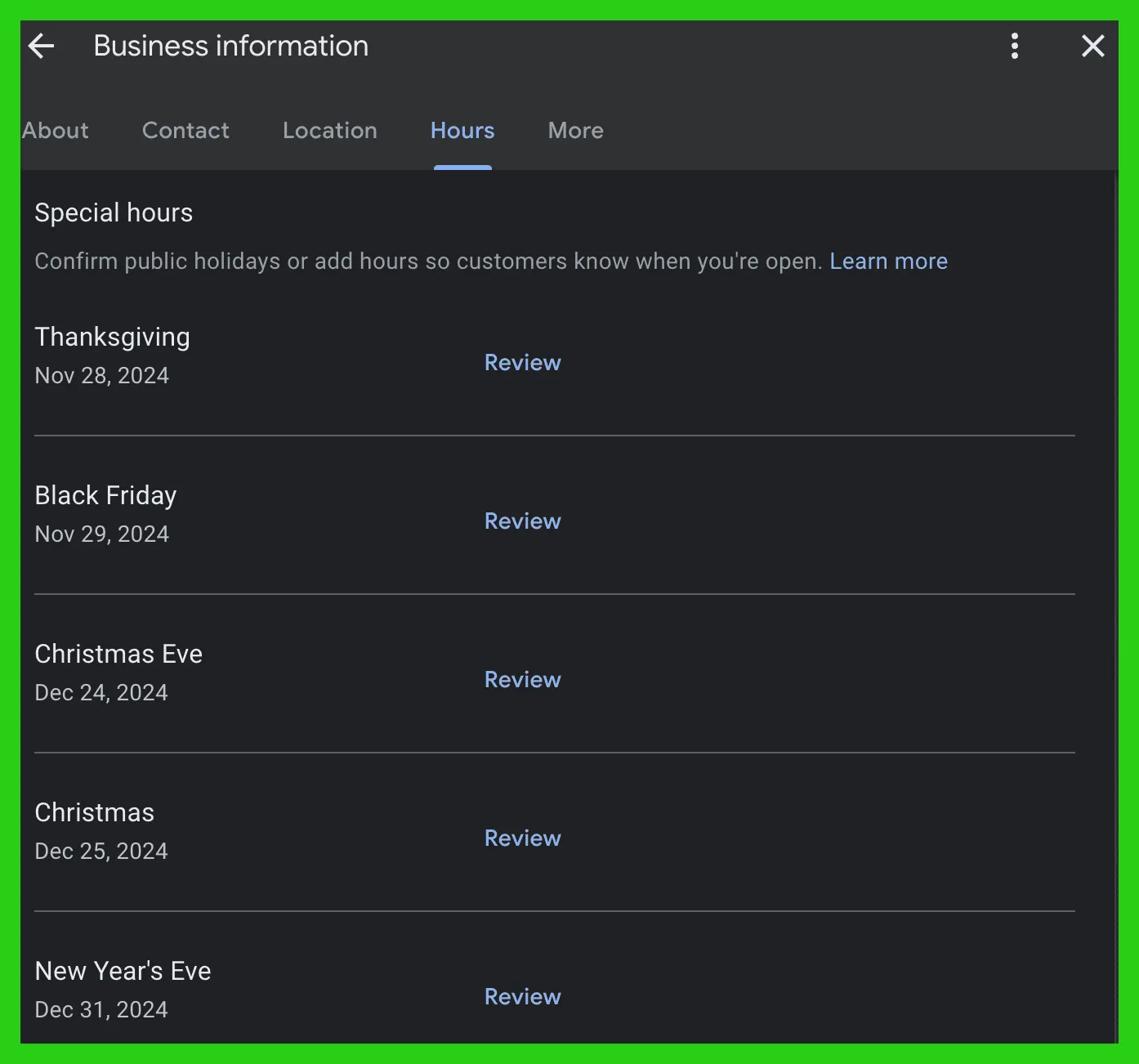
Post the hours when someone actually answers the phone, and set special hours before every holiday, like the screen at the top of this post. In late 2023, Google’s Search Liaison confirmed that “openness” became a stronger local ranking signal, and also said he wouldn’t recommend changing hours to take advantage of it. Don’t list 24 hours unless a person picks up at night. A homeowner who calls at 11 p.m. and gets voicemail calls the next company.
Services and description
In the services editor, add every suggested service you really offer, then custom ones like bed bug treatment, termite inspection, rodent exclusion and mosquito control, each with a plain description. Google rejects custom service names that include prices or phone numbers.
The description gets 750 characters, according to Google’s guide to editing your profile, with no links or promotions. I don’t write it for keywords. I write it for the homeowner, often with a few lines on how the company started and what it stands for. While you’re in the editor, add your opening date, logo, cover photo and social profiles.
Photos and videos
Real photos do more for a pest control Google Business Profile than almost anything else you can add in an afternoon. Show your trucks, techs, office and equipment, or a garage door gap before and after you sealed it. Phone photos with good light and a person in them beat stock images. A lot of the profiles I audit have only a handful of photos, and some are blurry.
Make it a habit for techs to snap a photo at a few stops each week and send them to whoever runs the profile. Add a few short videos too.
Features that changed
Business Profile chat ended on July 31, 2024, and call history went with it. Q&A is gone too. By early 2026, legacy Q&A no longer showed on profiles, and in the Google Maps app people can ask about a business and get an AI answer drawn from sources like your reviews. Guides that tell you to seed your own Q&A are out of date.
Post once a week
We post on every client profile once a week. Google offers three post types: updates, offers and events. You can schedule posts ahead, set them to repeat and publish one post to several profiles at once.
Profile posts aren’t social media. Someone on your profile is already deciding who to call, so give them a reason to pick you.
- A seasonal warning, like termite swarmers in spring or mice moving indoors when it turns cold
- A recent five-star review turned into a simple graphic
- A before and after from a real job
- An offer with a real end date, posted as an Offer
- A new blog post, with a photo, a few sentences in your own voice and a link
Use horizontal images and add a button to the right page. Keep phone numbers out of the post text, because Google may reject a post with a number it can’t tie to your business. Mat Rogers of Lizard Marketing told me to treat your Google Business Profile like your Instagram, with review replies, fresh content and links to your local pages.
Reviews and replies
Google says more reviews and positive ratings can help your local ranking, and homeowners read them before they call. Ask every customer, and aim for about one new review a week on each profile. A steady pace beats a burst followed by months of nothing, and a slow review pace is one of the most common problems I find on audits.
Asking in person, right after a good service, works best. Carmen Reino told me Anchor tried the review programs, and nothing beat asking face to face with a QR code that goes straight to the profile. Google gives you a review link and QR code for your profile. Ask, show the code, let the customer leave the review on their own time, and follow up with a text that has the link.
Stay inside Google’s review policy. It doesn’t allow any of these:
- Offering a discount, free service or anything else in exchange for a review
- Asking only the customers you think are happy
- Pressuring someone to write a review while you’re on site, including standing there while they type
- Asking for specific content, like a tech’s name or “termite control in Raleigh”
The same policy says merchants shouldn’t ask staff to bring in a set number of reviews, so track your weekly pace as a company number, not a quota for each tech.
Reply to every review. Google’s tips for replies say to keep them short, specific and free of promotions. On a bad review, don’t argue or share the customer’s details. Say what you’ll do and offer to talk by phone. If a review breaks Google’s policies, like one from someone who was never a customer, flag it. With several profiles, send each customer to the one for the office that served them.
Link each profile to the page for its city
Each profile’s website link should go to the page about that profile’s city. If you have one profile, link it to your homepage and build the homepage around your home city, as in my website template. With a few profiles, the main office still links to the homepage and every other office links to its own location page, so the Naperville profile goes to your Naperville page.
Past about 10 locations, I’d usually stop treating the homepage as one city’s page and link every profile to its own location page. The exception is a company whose top city is a big one the rest of its area identifies with. If you’re based in Chicago and your other offices are in the suburbs, the homepage can still be your Chicago page.
When I changed one pest control company’s profile link from the homepage to the matching location page, it started ranking for some of those city keywords.
That only works if the page is good. It needs the city in the title and H1, the same name, address and phone number as the profile, an embedded map, real photos from jobs in that town and content you couldn’t paste onto another city’s page. If you don’t have one for each profile, that’s often where a new pest control website starts.
Add UTM tags so profile visits show up as their own source in Google Analytics, with a link like https://yoursite.com/naperville?utm_source=google&utm_medium=organic&utm_campaign=gbp-naperville. You can also link a Business Profile to GA4 under Admin, then Product links, to share calls, website clicks and direction requests with Analytics. Call tracking on the profile needs care, and I cover it in pest control call tracking.
Then run each profile through our free KGmid extractor to get its KGmid and CID, and reference the profile in that page’s LocalBusiness schema.
Owners, managers and more than one location
Keep ownership in the company’s name
Every profile has one primary owner and can have more owners and managers. Only owners can add or remove people, according to Google’s roles. Make the primary owner a Google account the company controls, ideally tied to a company email address, not a tech’s Gmail or an agency’s account. Give your office manager and any agency manager access, and remove people the week they leave.
Getting a profile back from a former employee or an old agency can be slow, and someone newly added has to wait 7 days before primary ownership can move to them. Our clients own their profiles, websites and accounts, and I’d hold any agency to that.
More than one location
Google allows one profile per real location with its own staff, and a service-area business gets one profile for the whole area it covers. Don’t put two profiles in the same city, and never create one for a town where you have no office. Give each profile its own location page, reviews, posts and rank tracking.
If you buy a company, keep its profile. Chase Goodeill bought a Chicago company with 6 Business Profile listings, each with 250 or more five-star reviews, and he keeps an acquired company’s listings and phone number. Make name or address changes slowly, one at a time.
If your profile gets suspended
Don’t create a new profile, and don’t rush the appeal. Google’s appeals tool lets you appeal a decision only once, so gather evidence first, like a business registration, license or utility bill with the same name and address as the profile. If you can’t tell why, ask a Product Expert in Google’s community forum before you file.
What I check every month
Most profiles I audit aren’t broken in one big way. They’ve drifted. A second office’s profile links to the homepage instead of its own town’s page, the primary category is wrong or there’s a pile of categories for work the company doesn’t do. Holiday hours were never set. Reviews slowed to one a month, and the phone number in the website’s schema doesn’t match the profile.
A profile in good shape shows up in calls. Our client Arete Pest Control in Norcross, GA saw Google Business Profile calls go up 57%, with 441 calls in the 4 weeks from January 27 to February 24, 2025, compared with the 4 weeks before (CallRail).
Reviews are the one I end up repeating. One of our clients had four Business Profiles and kept asking me why one of them never performed while the other three did. I kept coming back to the same answer: that profile hadn’t gotten a review in over two months. We could do everything else right, and it still wasn’t going to rank. In a competitive area, I see rankings start to slip after a week or two without a new review.
Google itself tells owners to review profile performance every month. Once a month, check each profile for these things.
- Calls, website clicks, direction requests and search terms, against last month and the same month last year
- Your review pace, and a reply on every review
- Anything shown in blue in the editor, which Google changed, and any edits users suggested, which you have 4 days to accept or reject
- Your name, hours, categories and website link, exactly as you set them
- A post every week and a few new photos
- Special hours for next month’s holidays
- The users list, so only current staff and your agency have access
- A map grid scan for your main keywords, and visits from your UTM link in GA4
If you’d rather hand it off, that’s what our Google Business Profile service is for, alongside the rest of our pest control SEO work.
Questions pest control owners ask
Is Google Business Profile the same as Google My Business or Google Workspace?
Google My Business is the old name for the same free listing. Google Workspace is different, a paid subscription for company email, calendars and files on your own domain. You don’t need it to run a profile, though a Workspace address makes a good company-owned login.
Does posting on Google Business Profile improve rankings?
Google doesn’t list posts among its local ranking factors, and I can’t prove a post moves rankings on its own. In my experience an active profile does better, and posts are the easiest way to keep one active. Mostly they turn profile views into calls.
Can I use my home address?
Yes, as a service-area business with the address hidden. Google’s video verification lets you film signs and landmarks in your neighborhood if you run the business from home. Don’t show a home address as if it were an office customers can visit.
How soon will changes show up?
Fixes to your category, website link and hours can show up within weeks once Google picks them up. Reviews and a better location page take months. If you’d like help with yours, book a call.
Get one lesson from the top operators in pest control every Wednesday
A short email from my podcast, Pest Control Legends, when each new episode comes out.
Want more calls from Google?
Book a 30-minute discovery call with Dan to see if we’re a fit.