Blog / Local SEO
How to Use a Local SEO Heatmap (5x5 Map Grid) for Pest Control

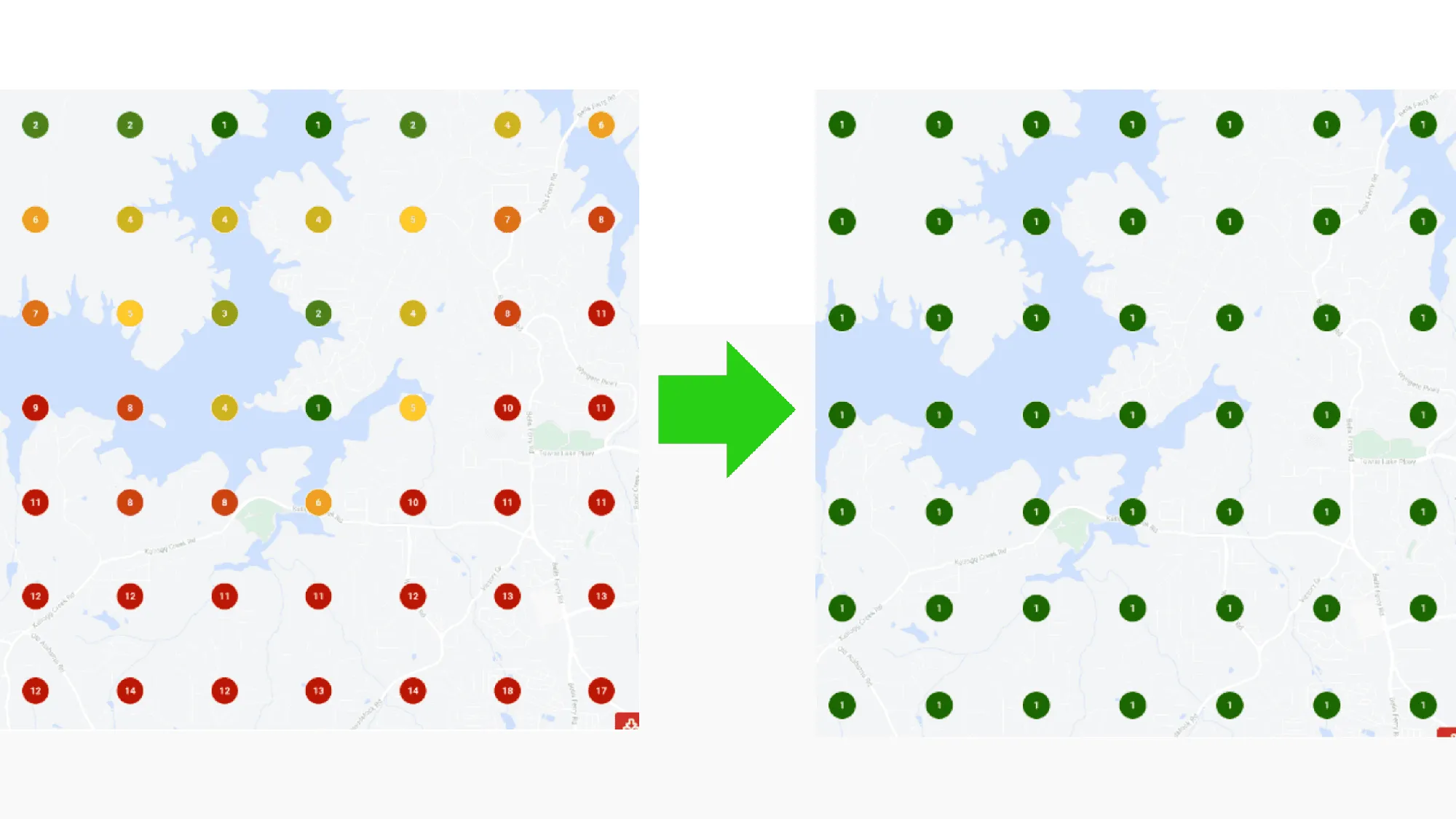
A local SEO heatmap, or map rank grid, checks where your Google Business Profile ranks on Google Maps from a grid of points around your office and colors each point by rank. For a pest control company, it shows which neighborhoods see you in the top 3, where you fall off and whether your work is paying off.
I run a grid on every audit and for every client. A normal rank check tells you what one spot in town sees, and your customers live all over your service area. This post covers setting one up, reading it and what it can’t tell you.
What a local SEO heatmap shows you
When someone searches “pest control” on their phone, Google ranks the map results partly on where that person is. Two homeowners five miles apart can see different companies in the top 3.
A grid tool simulates that. It lays a grid of points over your area, usually centered on your business, and runs the same search from every point. Each pin shows your rank at that spot. Dark green means a top 3 spot in the map pack, yellow and orange mean you’re further down, and red means you’re effectively invisible there.
That gives you a picture of the map pack across your whole area instead of one number from one spot. A lot of pest control calls start in that map pack, and a regular keyword tracker can’t show it to you. The image at the top of this post is a pair of 7x7 grids, before and after.
This is the part owners get wrong most often. I talked with one owner who was sure their Business Profile showed up really well, yet it brought in almost no leads. They’d been checking by searching Google themselves. When I ran a scan in Local Falcon, they weren’t in the top 3 anywhere. If you want to know how your profile actually performs, you need a map scan, and you need several of them, one for each keyword that matters to you.
Size the grid to your service area
Grid size and spacing should match where your trucks go. A grid that reaches 10 miles past your last customer paints the map red and tells you nothing useful.
Two settings matter, the number of points and the spacing between them (some tools ask for a total radius instead). More points over the same area gives you more detail, not more reach.
| Grid | Points | Where it fits |
|---|---|---|
| 5x5 | 25 | A quick check, a small town or a tight service area |
| 7x7 | 49 | Most single-office pest control companies |
| 9x9 or larger | 81 or more | A big metro, or when you want detail across a wide area |
In The Complete Guide to Pest Control SEO, I suggested starting with a 9x9 scan over a 5-mile radius. Local Falcon suggests a radius of about 2 miles in a city, 5 in the suburbs and 10 in rural areas. Think in routes. A company working one dense suburb needs tighter spacing than one covering half a county.
Watch for points that land on water. If your area has a lake, a big park or a stretch of farmland, those pins drag your numbers down without telling you anything. Local Falcon lets you remove them, and BrightLocal’s grid lets you place points where people actually are.
Then keep the center, the size, the spacing and the keywords the same every time. Change any of them and you can’t compare one scan to the next.
Which keywords to run
Grid the searches that bring you customers. For most pest control companies that starts with “pest control” and “exterminator,” then the services you sell, like “termite control,” “mosquito control,” “rodent control” or “bed bug treatment.” Skip services you don’t offer.
Run each keyword without a city name. The grid point stands in for where the searcher is, which is how most people search on a phone. “Pest control near me” is worth adding too, since a lot of homeowners type it that way. I cover that search in how to rank for “pest control near me”.
A keyword with your town in it, like “pest control Naperville,” is a different test, because Google leans toward businesses in whatever town the searcher names. Keep it out of your main tracking.
Keep the list short, since every keyword is a separate scan.
Average rank vs. share of the map
Grid tools report two kinds of numbers.
Average rank adds up your rank at every point and divides by the number of points. That’s how Semrush’s Map Rank Tracker defines it. Local Falcon splits it in two. ARP measures you against the top 20 listings it finds, and ATRP measures you against all of them, according to its guide to reading a scan report.
Share of the map is how much of the grid you own at the top. Local Falcon’s version is SoLV, a score out of 100 for how often you show in the top 3 across a scan. Semrush calls its version share of voice and compares you with competitors.
I watch the share more closely. The map pack shows three companies, and a homeowner who has to dig past them to find you usually calls someone else. Say two grids both average 6. One has you in the top 3 across the half nearest your office and in the teens at the edges. The other has you at 5 or 6 everywhere. The first one is getting calls, while the second is close everywhere and winning almost nowhere.
Average rank still earns its place. On the same settings, an average that drops month after month means the profile is getting stronger, even before the top 3 spots flip.
Why rankings fade as you move away from the office
Google ranks local results on relevance, distance and prominence. On its local ranking help page, it says “Distance refers to how far each business is from the customer who’s searching.”
Your profile’s distance is measured from the address you verified. In my experience that holds even when you hide the address as a service-area business, and no list of service areas on the profile stretches it.
Relevance and prominence push back against distance. Google says prominence draws on things like how many sites link to you and how many reviews you have. A company with more reviews and a stronger website keeps its top 3 spots farther from the office than a weaker one, which is why two companies on the same street can have very different grids.
A profile rarely holds the top 3 in towns well past its own, though. Ranking there takes your website and ads, which I cover in building local SEO outside your core location.
How I read a grid that’s green near the office and red at the edges
That’s the grid I see most often, and on its own it’s normal. Almost every profile ranks best near its address. I want to know how far the green reaches, and whether it covers the neighborhoods the owner actually wants.
When I open a grid on an audit, I look for a few patterns.
Green in the middle, red at the edges
Pull the same grid for your top two or three competitors. Most grid tools will show you their ranks too. If their green reaches a ring or two farther than yours, the gap usually comes down to reviews, links or the page your profile links to.
Weak even at the office
Something is wrong with the profile itself. The usual causes I find are the wrong primary category, wrong hours, a profile linked to a page that isn’t about its town, or reviews that stopped coming in months ago. Check that the pin sits on your real address while you’re there.
Green for “pest control,” red for “termite control”
Google doesn’t connect you with that service yet. Add it to your profile’s services, make sure your website has a real termite page and link to that page from your location page.
Green on one side, red on the other
That’s usually a cluster of strong competitors, a town line or empty land like a lake. Look at who ranks first on the red side before you decide what to do about it.
When the red sits on neighborhoods inside your routes, SEO isn’t the only tool. Lenny Gray told me he’d plug a door-to-door team into one zip code until the routes there are full. I’d point that team at the weak spots on the grid.
What moves a map grid
The things that rank a Google Business Profile anywhere are the same things that move a grid, and reviews come first. Google says more reviews and positive ratings can help your local ranking. I aim for about one new review a week per profile. Mat Rogers made the case on my show that steady reviews beat a big push followed by silence.
Ask every customer, not just the ones you think loved you. Never attach a discount or a free service to a review, and never stand there while someone writes one. Google’s review policy bans incentives, pressure and asking only happy customers.
After reviews, I’d work through the profile itself:
- The right primary category, and secondary categories only for services you sell.
- Hours that match when someone answers the phone.
- Your services filled in, real photos from jobs and a post once a week.
- A link to the page about the profile’s town. For your main office, that can be a homepage built around your home city.
I once switched a pest control company’s profile link from its homepage to the matching location page, and the profile started ranking for some of those keywords. The page needs to deserve it, though, with the town in the title, real photos and reviews from people who live there.
Then build prominence with local links. A chamber of commerce listing, a youth team sponsorship or a home inspector who links to you does more than a pile of directory listings.
Leave out the shortcuts. A fake address in another town, a virtual office or a business name stuffed with keywords can move a grid for a while, but they break Google’s guidelines for Business Profiles, and Google can suspend a profile over them.
One of our clients, SmartGreen Pest Control in Woodstock, GA, went from an average map rank of 8.0 to 1.0 on a 7x7 grid, three months later. Those are the two grids at the top of this post. My Google Business Profile guide covers the whole profile, and if you’d rather hand it off, that’s our Google Business Profile service.
Picking a grid tool
These are the three grid tools I’d look at first.
| Tool | Grid feature | Worth knowing |
|---|---|---|
| Local Falcon | Scan reports | ARP, ATRP and SoLV, scheduled scans and competitor reports. It also tracks visibility in ChatGPT, AI Overviews, Gemini and AI Mode |
| BrightLocal | Local Search Grid | Grids up to 15x15, points you can place yourself, competitors’ grids and side-by-side comparisons over time |
| Semrush | Map Rank Tracker | Part of Semrush Local. Average rank and share of voice per keyword, with a heatmap for each scan date |
I’ve used BrightLocal for scheduled scans and Local Falcon for one-off checks, and Semrush’s version makes sense if you already pay for Semrush. Pick one and stick with it, because the tools count things differently and their numbers won’t match each other.
How often to run a scan
Monthly is plenty for tracking. Run a baseline before you change anything, then scan on the same day each month with the same settings.
Rankings shift a little from day to day, so a weekly scan mostly shows you noise. After a real change, like a new location page or a category fix, give it a few weeks before you judge it.
What a grid can’t tell you
A grid is a simulation. It runs searches from fixed points, while real homeowners search from wherever they are, and Google uses what it knows about each person’s location. Treat the grid as a trend line, not an exact score.
It doesn’t count calls. I’d rather look at the calls and website clicks coming in than at any ranking report. A top spot over a neighborhood of 40 homes is worth less than third place over a neighborhood of 4,000. Track calls by source with pest control call tracking and judge your grid against them.
It also covers only the map. Local Services Ads above it, AI Overviews and the organic results below it all decide who gets the call too, and working on all of them together is what pest control SEO means to me.
Questions pest control owners ask
What’s a good average rank on a map grid?
Lower is better, and 1.0 means first at every point. What counts as good depends on the size of the grid and how crowded your market is, so compare against your own last scan and your top competitors on the same settings.
Is a 5x5 grid big enough?
For a quick check or a small service area, yes. For tracking a single-office pest control company over time, I’d use 7x7 or larger so you can see the neighborhoods between your office and the edge of your routes.
Why doesn’t the grid match what I see on my phone?
Your phone searches from where you’re standing, and the grid searches from fixed points. Both are real results, just from different places.
Should I run grids on my competitors?
Yes. Seeing where a competitor’s green ends tells you where you can win soonest. Local Falcon and BrightLocal both show competitor rankings, and Semrush compares your share of voice with theirs. If you want an expert to look at yours with you, book a call.
Get one lesson from the top operators in pest control every Wednesday
A short email from my podcast, Pest Control Legends, when each new episode comes out.
Want more calls from Google?
Book a 30-minute discovery call with Dan to see if we’re a fit.