Blog / Local SEO
Technical SEO for Pest Control Websites: What I Find and How to Fix It

Technical SEO for pest control websites makes sure Google can find, index and quickly load your pages on a phone. Most of the problems I find are www and non-www versions both live, old URLs broken after a redesign, slow plugin-heavy sites, tracking numbers in schema, broken headings and pages nothing links to.
My pest control SEO tips cover the quick checks. This post goes deeper on the technical side of pest control SEO, and most of it works as a list to hand whoever manages your site.
Technical SEO for pest control websites starts in Search Console
Google Search Console is free, and it shows what Google actually did with your pages. Open the Page indexing report first. Google says not to expect every URL on your site to be indexed, and that’s fine. What matters is whether your homepage, service pages and town pages are in. For the pages left out, Google gives a reason, and a few come up on a lot of pest control sites:
- URL marked ‘noindex’ on a page you want ranked usually means a setting was left on from when the site was built.
- Not found (404) lists URLs that used to work or that something still links to. Missing redirects after a redesign show up here.
- Duplicate without user-selected canonical usually means two versions of a page, like www and non-www, with no canonical tag saying which one you want.
- Crawled - currently not indexed means Google looked and passed for now. Thin or near-copy city pages often land here.
To check a single page, paste its URL into the URL Inspection tool. It shows whether the page is indexed and which canonical Google chose, and once you’ve fixed a page you can request indexing there.
XML sitemap and robots.txt
Your XML sitemap is the list of pages you’re asking Google to index. Most platforms and SEO plugins build one automatically, which is how it fills up with tag pages, image attachment pages and old test pages. Open it (usually /sitemap.xml or /sitemap_index.xml) and make sure it lists only real pages that load, aren’t redirected and are the version you want. Submit it in Search Console’s Sitemaps report.
Robots.txt tells search engines what not to crawl. My SEO tips cover the worst case, a “Disallow: /” line left over from development. People also make the opposite mistake and use robots.txt to hide pages. Google says robots.txt is not a mechanism for keeping a web page out of Google and to use a noindex tag or a password instead. That goes for staging sites too, since a test copy anyone can open can end up in search results.
One version of every page
www, non-www, http and https
I find www and non-www both loading on a lot of the sites I audit. Add http and https, and Google can see up to four copies of every page, with your links split between them.
Type all four versions into a browser, or run them through a redirect checker or a crawler like Screaming Frog. Each one should land on your preferred URL with a single permanent (301) redirect.
Then check your own links. Google’s advice is to link to the canonical URL rather than a duplicate. After a switch to https or to non-www, old menus, footers and blog posts often still point at the old version.
Canonical tags
A canonical tag is a line in a page’s code that names the main URL for that page. Every page should have one pointing to itself, in your preferred version. Google treats redirects and canonical tags as strong signals and sitemaps as a weak one, so keep all three pointing the same way.
When I check canonicals, these are the mistakes I look for:
- Canonicals still pointing to the http version, the old domain or a staging site after a migration.
- A template that sets every city page’s canonical to the homepage or to one city page, which tells Google to ignore the rest.
- A theme and an SEO plugin each setting a different canonical. Google says not to name different canonicals for one page with different methods.
A self-referencing canonical also covers the tracking parameters ads and emails add, like ?gclid= or ?utm_source=, so those versions aren’t treated as separate pages.
Redirect every old URL after a redesign
A new website usually changes some URLs. The old /termite-control.html becomes /termite-control, or your city pages move into a folder. Every link and ranking the old URL earned then points at nothing, unless you redirect it.
Google’s site move guide starts with a map of every old URL to its new one. Build it before launch from the old XML sitemap, the Pages tab of the Performance report in Search Console (so you catch every page that got clicks) and a backlink report from Semrush or a similar tool (so you catch pages other sites link to).
Redirect each old URL to its closest match with a permanent, server-side redirect. Google warns against sending many old URLs to one irrelevant page, like the homepage, because it may treat that as a soft 404. If an old page with traffic or links has no match, build one.
Google says to keep redirects for at least a year, and I’d leave them in place for good. After launch, update internal links to the new URLs, submit the new sitemap and watch the Not found (404) list in Search Console for a few weeks. Update the website links on your Google Business Profile, Yelp, Facebook and directories too.
Whoever builds your new website should hand you the redirect map before launch and keep the city in the titles and H1s of pages that ranked.
Speed and Core Web Vitals
Google measures page experience with three Core Web Vitals. Its targets are a Largest Contentful Paint (when the main content shows up) within 2.5 seconds, an Interaction to Next Paint (how fast the page reacts to a tap) under 200 milliseconds and a Cumulative Layout Shift (how much the page jumps around) under 0.1. INP replaced First Input Delay in March 2024, so a guide or plugin still talking about FID is out of date.
Start with the Core Web Vitals report in Search Console, which reflects real visitors over time. PageSpeed Insights adds a lab test that tells you what to fix. Look at mobile, because the desktop score is almost always better and tells you less.
Beyond plugins, I usually find uncompressed photos and a slider or background video at the top of the page. Review widgets, chat widgets and ad pixels add weight to every page they load on.
Heavy themes, page builders and stacked plugins
Slow, plugin-heavy sites are one of the most common things I find. On WordPress, there’s usually a theme built to do everything, a page builder on top of it, sometimes a second builder left from an old redesign, and a long list of plugins, some inactive and some doing the same job.
Most of the fix is subtraction. Delete plugins you don’t use, keep one page builder and move to a lighter theme if yours is the problem. Then add caching and image compression. Aaron Shishilla of WolfPack Advising recommends WP Rocket and Imagify for those jobs, and they’re what we recommend too. A CDN like Cloudflare helps with speed and security.
Run one SEO plugin. Yoast, Rank Math and All in One SEO all handle titles, meta descriptions, sitemaps and schema, and two at once can print duplicate tags, duplicate schema and two sitemaps. We recommend Rank Math. Aaron told me he’s been testing it too, because he thinks Yoast has slipped. Any of the three works if it’s set up properly.
Our newer builds skip plugins altogether. We’ve started building pest control sites as static sites with Astro, hosted on Cloudflare, so there’s no database or plugin stack behind each page to slow it down.
Keeping what’s left updated and fast is ongoing work, and it’s what our website maintenance service is for. If you’re still choosing a platform, I compare them in my pest control website template guide.
Mobile is the version Google reads
Google indexes the mobile version of your site, so anything missing on mobile is missing for Google. Its mobile-first indexing guide asks for the same content, headings, structured data and image alt text on mobile as on desktop.
Tabs and accordions are fine, but content that only loads when someone taps is a problem, because Google doesn’t tap. In The Complete Guide to Pest Control SEO, I showed a page ranking for “pest control Glenview” whose headings the META SEO Inspector extension flagged as hidden, which usually comes from a scroll effect on the text. Effects like that slow the page and can hide your content from search engines.
Then test the parts that turn a visitor into a call, on a real phone over cellular data:
- Tap the phone number in the header and in the body. Both should start a call.
- Fill out the form. The phone field should bring up the number pad, and the button should be easy to hit with a thumb.
- Scroll the page. A sticky header or chat bubble shouldn’t cover the content or the call button.
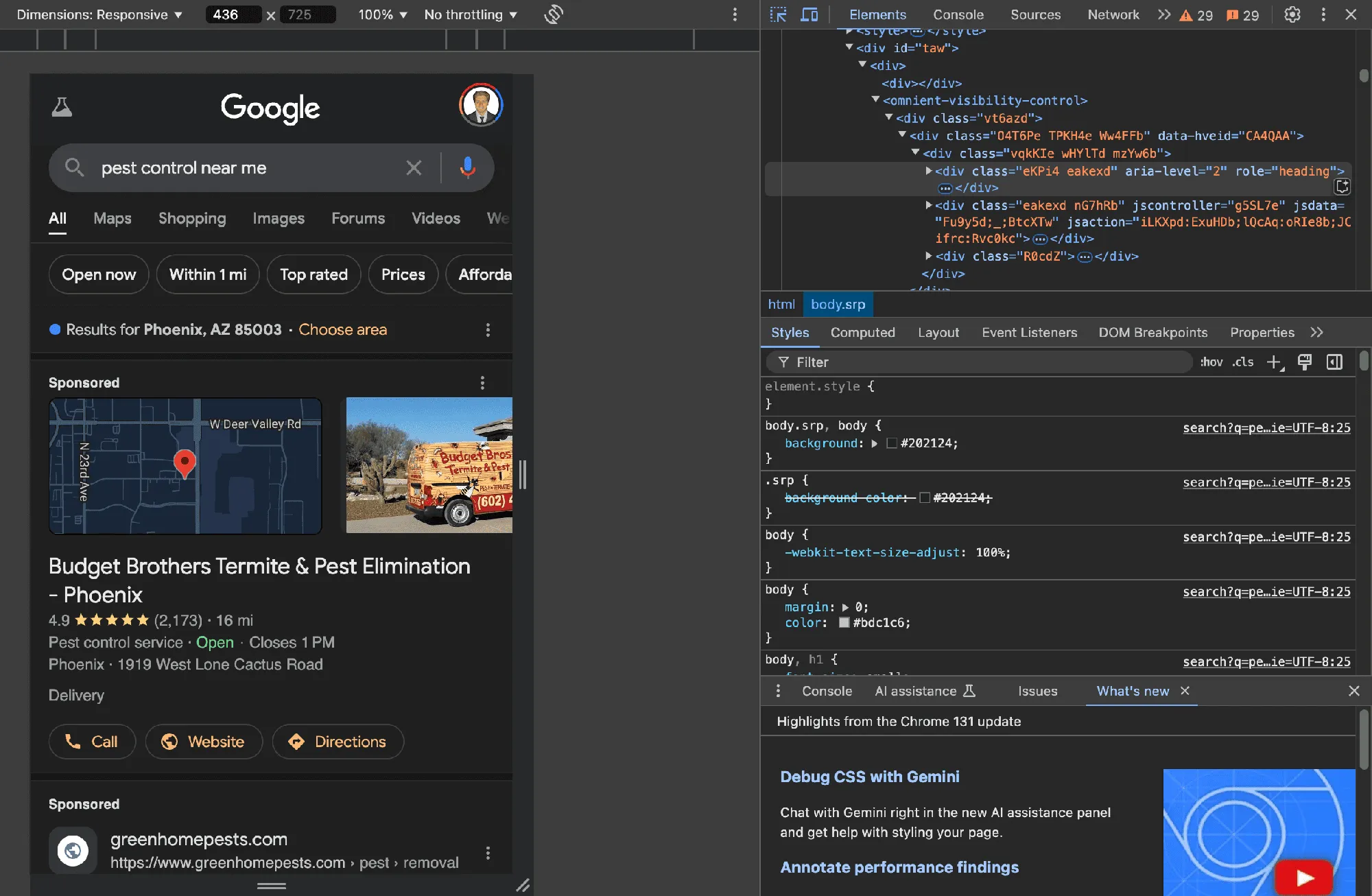
Chrome’s DevTools device mode, like the screenshot at the top of this post, is a quick way to check layouts at phone width first.
Schema with one set of business details
Schema is code that states facts about your business in a format Google reads easily. For a pest control company, the main type is LocalBusiness, on your homepage and each location page. Google’s local business structured data guide requires only a name and address, and recommends the phone number, URL, hours and coordinates.
Inconsistent business details and tracking numbers in schema come up in a lot of my audits. Google describes the telephone property as a business phone number meant to be the primary contact method for customers. Use the main number on your Google Business Profile, not a CallRail number that appears only on the website, and match the name, address and hours to the profile exactly. Each location page should carry its own office’s details. My guide to call tracking covers where tracking numbers belong.
Check how many tools are writing schema. A theme, an SEO plugin and a reviews plugin can each add LocalBusiness markup with different details. Run your homepage and a location page through Google’s Rich Results Test or the Schema Markup Validator, and make sure you see one business with one set of details.
Headings and images
Every page needs one H1 that says what the page is and where, like “Rodent Control in Dublin, OH,” with H2s and H3s in order under it. Pages with no H1, or several, are a regular find in my audits.
Usually the theme or page builder is to blame. Some themes wrap the logo in an H1 on every page, page builders make it easy to tag a phone number as an H2, and some headlines sit in a plain text block with no H1 at all.
For images, resize photos to the size they display at and compress them, ideally as WebP or AVIF. Set a width and height on every image so the page doesn’t jump. Lazy-load images further down the page, but not the main photo at the top, which needs to load first. Use descriptive file names and alt text, like “technician sealing a gap under a garage door in Dublin, OH.”
Broken links and orphan pages
Crawl your whole site at least monthly with Semrush Site Audit or Screaming Frog, and Semrush can run the scan weekly and email you the results. Fix internal links that point to 404 pages, and update links that pass through a redirect so they point straight at the final URL.
An orphan page is one that no other page on your site links to. Google’s link guidance says every page you care about should have a link from another page on your site, and a crawler that starts at your homepage can’t reach an orphan either. To find them, compare the URLs in your sitemap with the ones your crawler found. Anything the crawl missed is an orphan.
On pest control sites, the usual orphans are town pages that never made it into the menu or service areas page, old ad landing pages and blog posts nothing links to. Link each one from the pages that should point to it, like the service area hub, neighboring towns and related posts.
Check that your links are real links, too. Google can only crawl a link if it’s an <a> element with an href, so a menu built from buttons that run a script can leave pages out of reach.
Questions pest control owners ask
How often should someone check my site’s technical SEO?
Someone who knows the tools should check Search Console and a site health scan weekly, run a full crawl monthly and check again after any redesign or platform change.
Does page speed affect rankings?
Google recommends good Core Web Vitals and says page experience lines up with what its ranking systems reward. A slow page also loses callers before they see your number, whether or not your rankings move.
Can I fix technical SEO myself?
Some of it. Search Console checks, submitting a sitemap, alt text and deleting unused plugins don’t need a developer. Redirects, canonicals, schema and most speed work usually do.
Will a new website hurt my rankings?
It shouldn’t, if every old URL redirects to its match and the new pages keep or improve the titles, headings and content that ranked. Plan the redirects before launch. If you’d like a second set of eyes on a rebuild, book a call.
Get one lesson from the top operators in pest control every Wednesday
A short email from my podcast, Pest Control Legends, when each new episode comes out.
Want more calls from Google?
Book a 30-minute discovery call with Dan to see if we’re a fit.